architars

architars

architars

AT SWEEP

Why Does Sweeping Become So Difficult?

Creating a sweep, pipe, or structural profile seems simple at first. Select a path, choose a profile, and generate the geometry.

In real architectural modeling, however, the process often becomes much more complicated. Profiles need to be oriented, dimensions need to be adjusted, paths need to be cleaned, and the resulting geometry often needs additional correction. What should be a simple modeling operation can quickly turn into a sequence of interruptions, adjustments, and cleanup. AT Sweep was developed to make this process more direct.


Why Does Sweeping Interrupt the Design Flow?

Many sweep tools rely on a repetitive cycle: open a dialog, enter dimensions, execute the command, inspect the result, undo, change the settings, and try again. This may work for a simple operation, but architectural modeling is rarely that predictable. Designers often need to see the geometry while making decisions.

The moment a tool separates the adjustment process from the geometry itself, the modeling flow becomes fragmented. AT Sweep keeps the geometry visible while dimensions, rotation, thickness, and alignment are being adjusted. The result can be evaluated as the design develops, rather than after the command has already finished.


Why Does a Simple Sweep Require So Much Preparation?

A profile is not always ready to sweep. It may need to be rotated perpendicular to the path, aligned to a specific point, or adjusted to match the intended local orientation. These preparations are often treated as separate modeling tasks.

The same is true after the sweep. Source edges may remain in the model, auxiliary geometry may need to be removed, and the resulting object may require additional cleanup. The geometry itself is only part of the task. Much of the actual work comes from preparing and cleaning the geometry around it. AT Sweep is designed to reduce this unnecessary effort.


Why Do Simple Forms Need Multiple Tools?

A round pipe can be solid or hollow.

A rectangular pipe can have sharp or rounded corners.

A custom profile may need to be swept with different orientations or settings.

These are variations of the same fundamental form—not necessarily reasons to use completely different tools. Many modeling workflows treat these variations as separate operations, requiring designers to switch tools or modify the source profile before generating the desired result.

AT Sweep takes a different approach. Instead of creating a separate tool for every variation, each form is handled by a dedicated tool with the necessary variations built into it.

One tool for Round Pipe.
One tool for Rectangular Pipe.
One tool for Custom Profile Sweep.
One tool for Revolve.

Within each tool, the geometry can adapt to the designer's intent. A round pipe can transition between a solid rod and a hollow tube without modifying the source profile. A rectangular pipe can be created as a solid or hollow form, while corner conditions such as rounded edges can be controlled within the same tool.

The goal is simple.

One form, one tool—without unnecessary fragmentation.


Why Can Correct-Looking Geometry Still Cause Problems?

A sweep can look perfectly correct on screen and still contain problems that are difficult to see. Profiles can twist along complex 3D paths. Mitered corners can produce unexpected surfaces. Local orientations can become inconsistent. Surface normals can become inverted. These problems may remain unnoticed until the geometry is used in another operation.

Solid operations may fail. Edges may behave unexpectedly. Quantity calculations, fabrication workflows, BIM exports, or rendering processes may expose problems that were not visible in the original model. For architectural modeling, visual appearance is not always enough. The underlying geometry matters. AT Sweep was built with this in mind.


Designed to Keep You in the Flow

AT Sweep was developed around a simple idea. The tool should adapt to the designer, not the other way around. Dimensions can be adjusted through keyboard inputs and VCB commands. Rotation and alignment can be controlled while the geometry remains visible. Solid and hollow forms can be switched within the same workflow.

Profiles can follow complex three-dimensional paths without requiring the designer to manually manage every intermediate step. Source geometry is handled separately from the generated result, making cleanup more predictable and keeping the modeling process organized. The goal is not to automate the designer's decisions. It is to remove the interruptions that get in the way of those decisions.

AT Sweep

An integrated modeling toolkit for architectural sweeps, pipes, profiles, and revolved forms.

Core Tools:

Revolve
Round Pipe

Rectangular Pipe
Profile Sweep

$29

Launch Price

first 50 customers

Regular Price $39

  • Taxes calculated at checkout.

One-Time Purchase | Lifetime License

BUY NOW

Secure checkout powered by Lemon Squeezy

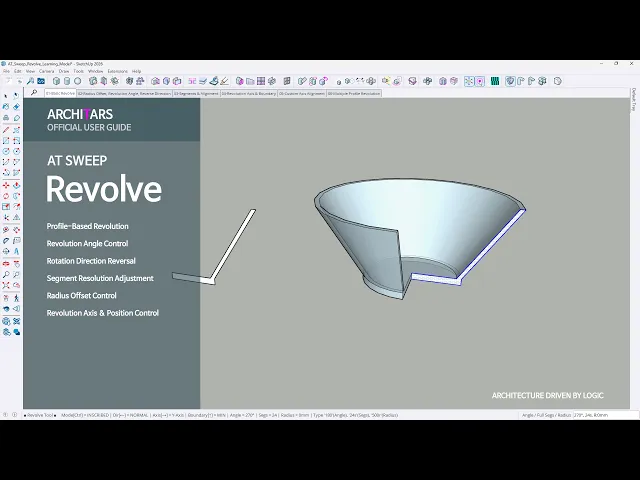
Revolve Create Revolved Solids Without Setting Up a Rotation Axis

Revolve creates 3D revolved forms directly from flat profiles without requiring a separate rotation axis. Instead of adding axis geometry for uncommon cases, it focuses on the axis conditions most frequently used in architectural modeling, allowing the profile's orthogonal boundaries to define the rotation directly.

Axis direction and placement, rotation angle, radius offset, and segment count can be adjusted dynamically through keyboard inputs and VCB commands. Hollow variations can be created without rebuilding the source profile, while consistent rotational direction and automatic normal orientation keep the resulting geometry clean and predictable.

This makes it ideal for architectural columns, balusters, domes, ceiling coves, moldings, and other rotational forms where unnecessary axis setup would only add extra steps to the modeling process.

Round Pipe Create Round Pipes with Real-Time Control
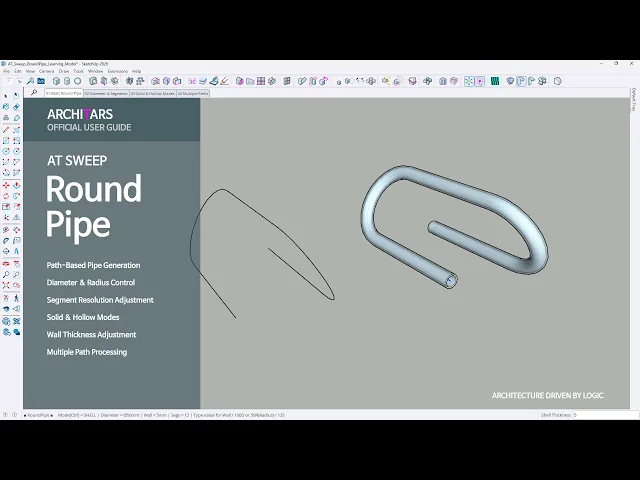
Round Pipe transforms selected paths into precise round pipes while keeping the entire process visible through a real-time preview.

Radius, segment count, and the transition between solid and hollow forms can all be adjusted instantly through keyboard inputs and VCB commands. Changes are reflected directly in the viewport, allowing the geometry to be refined while the tool remains active instead of generating, inspecting, and rebuilding the result repeatedly.

Once the pipe is created, the source path is automatically removed to keep the model clean. But the path is never difficult to recover. The first Undo restores the original path while keeping the generated pipe intact. A second Undo removes the pipe itself and returns the model to its previous state.

This makes Round Pipe useful for handrails, structural tubes, conduits, MEP piping, and other path-based forms where immediate visual feedback and flexible editing are essential.

Rectangular Pipe Create Rectangular Pipes with Real-Time Shape Control
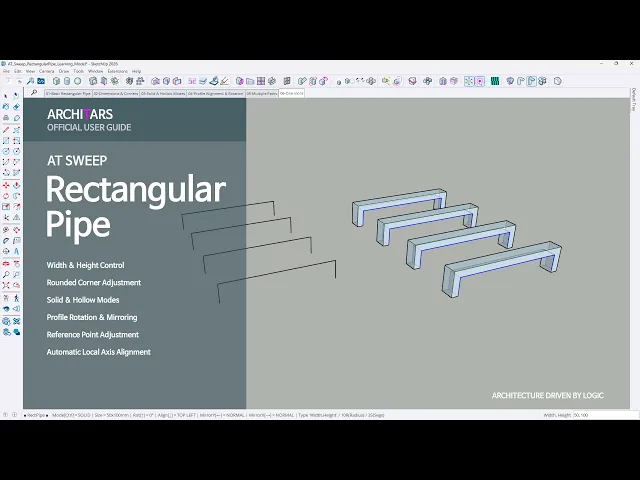
Rectangular Pipe transforms selected paths into rectangular pipes while providing direct control over the section throughout the modeling process.

Width, height, section rotation, corner radius, segment count, and the transition between solid and hollow forms can all be adjusted in real time through keyboard inputs and VCB commands. Rounded corners can be applied without modifying the source profile, allowing sharp-edged or radius-cornered sections to be created within the same tool.

Like the other AT Sweep tools, the source path is automatically removed when the pipe is created. The first Undo restores the original path while keeping the generated geometry intact, while a second Undo removes the pipe itself.

From structural box sections and frames to curtain wall members, architectural moldings, and custom rectangular trims, Rectangular Pipe keeps the entire rectangular-form workflow within a single tool.

Profile Sweep Sweep Custom Profiles Without Manual Alignment
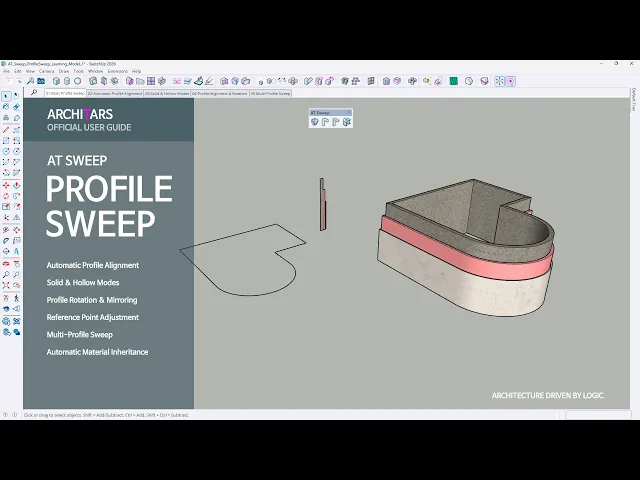
Custom Profile Sweep creates swept forms from user-defined profiles without requiring the profile to be manually positioned or oriented to the path first.

Wherever the profile is drawn and whatever its initial orientation, the tool automatically positions and aligns it to the path. Instead of manually moving, rotating, and repositioning the profile before every sweep, designers can use simple arrow keys to change its alignment relative to the path and immediately see the result in the viewport.

Rotation, shell thickness, and other sweep conditions can be adjusted while the preview remains active. The source path is automatically removed when the sweep is completed, while the same two-step Undo workflow allows the original path to be restored first or the entire sweep operation to be cancelled.

This makes Custom Profile Sweep particularly useful for cornices, baseboards, handrails, trims, facade elements, and other architectural forms where custom profiles need to follow a path precisely.

Current Limitations

Profile Alignment & Orientation Constraints

AT Sweep automatically aligns the selected profile to the path, eliminating the need to manually position and orient the profile before sweeping. Profiles positioned away from the path or rotated at arbitrary angles are not supported. However, profile rotation can be adjusted in 90-degree increments, with 15-degree increments available through Shift, allowing a range of common architectural configurations to be created directly within AT Sweep.

For sweeps that require an arbitrary profile offset or rotation outside these supported angles, use SketchUp’s native Follow Me tool.

Windows Compatibility

AT Sweep has been developed and verified with SketchUp 2026 on Windows. Compatibility with earlier versions of SketchUp has not been extensively tested. Users running older versions are strongly encouraged to evaluate the software thoroughly during the trial period before purchasing.

macOS Compatibility

AT Sweep has been developed and verified on Apple Silicon (M1 and later) running SketchUp 2026. Extensive testing has not yet been conducted on Intel-based Macs or older versions of SketchUp. Mac users are strongly encouraged to evaluate the software thoroughly during the trial period before purchasing.

Additional Notes

Installation Requirement

AT Sweep requires the Architars Core Library (AT Core) to be installed. AT Core is a shared library used by Architars extensions and is provided free of charge. Install AT Core before using AT Sweep. If AT Core is already installed for another Architars extension, no additional installation is required.

Continuous Updates

AT Sweep includes a built-in automatic update system. New versions can be installed directly from within SketchUp, without manually downloading files or replacing the extension.

Updates are driven by actual use and ongoing user feedback. Bug reports, workflow suggestions, and feature requests are continuously reviewed and incorporated into future releases where appropriate.

AT Sweep is actively maintained and continues to evolve through ongoing development and practical feedback from its users.

Future Updates Included

As AT Sweep continues to grow, its price may increase for new customers as new tools and capabilities are added.

Existing customers receive these updates and new tools at no additional cost. Your purchase remains valid as the product evolves, allowing you to benefit from future improvements without paying for each new version or feature added to AT Sweep.