

AT Array
AT Array
Grid and path arraying made fast and interactive.
Core Tools:
Rectangular Array
Path Control Array
$19
Launch Price
first 50 customers
Regular Price $29
Taxes calculated at checkout.
One-Time Purchase | Lifetime License
BUY NOW
Secure checkout powered by Lemon Squeezy
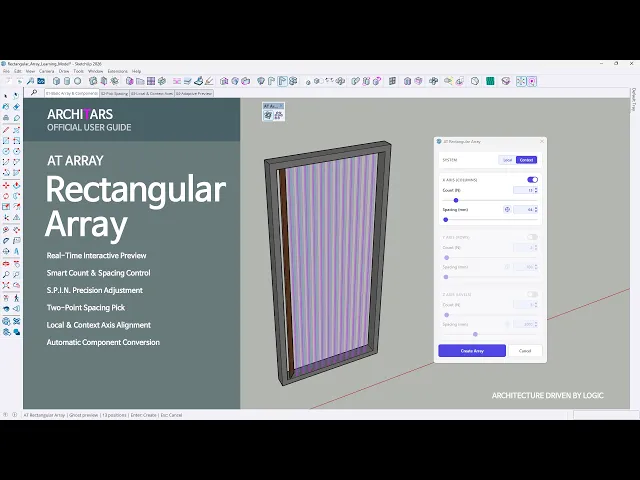
Rectangular Array A Smarter Way to Repeat an Entire Spatial Arrangement
Rectangular Array is designed around a simple idea:
An array should understand the geometry you are working with.
Instead of treating the selected objects as isolated elements placed along fixed world axes, it reads their spatial relationship, orientation, and actual size — then lets you adjust the entire array interactively while seeing the result in real time.
Intelligent Initial Spacing
A good array should not begin with a meaningless number. When Rectangular Array is activated, it analyzes the overall bounds of the selected geometry and uses that information to establish a sensible initial spacing. You can change the values immediately, but you don't have to begin by guessing. The first preview already gives you a useful starting point.
True Local-Axis Arraying
World axes are not always the right axes for your design. Rectangular Array uses the local coordinate system of the selected geometry as the basis for distribution. If the original object has been rotated, the array follows that orientation — preserving the object's own spatial direction as it expands. Rotate the source geometry, and the array follows. This makes it possible to array rotated groups and components without first realigning them to the global axes. The array follows the object — not the other way around.
Interactive Preview, Without the Performance Penalty
Arraying is inherently visual. You should be able to see the result while adjusting it, not after committing the operation. Rectangular Array therefore separates preview from actual model creation. Instead of repeatedly generating and deleting real SketchUp instances while you adjust the settings, the tool uses cached geometry to construct a lightweight visual preview. The actual array is created only when you press Create Array. For heavier geometry, the preview automatically adapts to model complexity, switching from detailed translucent geometry to a lightweight wireframe representation when necessary. Real-time control, without forcing the model to rebuild itself at every change.
Path Control Array A Path That Is Understood, Not Simply Followed
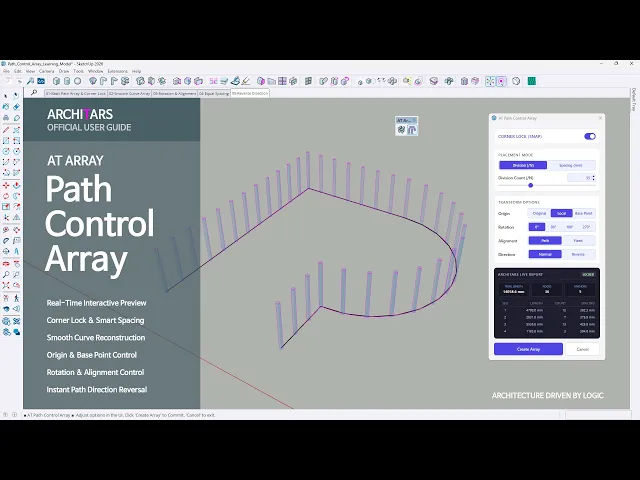
A path is more than a sequence of edges. When objects are arrayed along a conventional segmented path, they often follow each individual edge directly. The result can look fine along straight sections, but at every vertex the direction changes abruptly.
Path Control Array takes a different approach. Instead of simply following the original edge segments, it analyzes the path, reconstructs a continuous sampling path, identifies its important corners, and distributes the objects according to the structure of that path.
Select Everything. Path Control Array Figures It Out.
You should not have to tell the tool what you already selected. Select the object you want to array and the edges or face that define the path. Path Control Array analyzes the selection and automatically determines the array target and the path.
There is no required selection order.
No separate object selection step.
No need to tell the tool which element is the path.
Simply select what you need and run the tool. You select the geometry. Path Control Array understands the roles.
Smooth Path Reconstruction
A SketchUp curve is ultimately built from individual edge segments. If an array simply follows those segments, the orientation of each instance can change abruptly from one segment to the next. The smoother the curve appears visually, the more surprising this behavior can become.
Path Control Array reconstructs the path internally using sampled curve data and Catmull-Rom interpolation where appropriate. This creates a continuous path representation that can be evaluated by distance rather than by individual edge segments. The result is a much smoother transition of position and orientation along curved paths. The original edges define the path. The reconstructed path defines how the array moves.
Architectural Corner Lock & Adaptive Distribution
Smoothness is not the only requirement in architectural modeling. Important corners and changes in direction often need to remain meaningful reference points. A simple uniform division of the entire path can ignore those structural boundaries.
Path Control Array automatically identifies meaningful path anchors and preserves them as fixed reference points. It then analyzes the distance between each pair of anchors and distributes the available array positions within each section. Longer sections can receive additional divisions, while shorter sections remain appropriately proportioned. This allows the array to remain both continuous along the path and structurally aware of its important corners.
Real-Time Path Intelligence
All of this happens while you are adjusting the array. Path length, anchor locations, node count, and the distribution of each path section are calculated continuously and presented through the Live Report. You can see not only where the objects are going, but also how the path has been interpreted.
And because the preview is calculated independently from the actual model geometry, the result can be evaluated and adjusted before a single array instance is committed to the model.
Current Limitations
Windows Compatibility
AT Array has been developed and verified with SketchUp 2026 on Windows. Compatibility with earlier versions of SketchUp has not been extensively tested. Users running older versions are strongly encouraged to evaluate the software thoroughly during the trial period before purchasing.
macOS Compatibility
AT Array has been developed and verified on Apple Silicon (M1 and later) running SketchUp 2026. Extensive testing has not yet been conducted on Intel-based Macs or older versions of SketchUp. Mac users are strongly encouraged to evaluate the software thoroughly during the trial period before purchasing.
Additional Notes
Installation Requirement
AT Array requires the Architars Core Library (AT Core) to be installed. AT Core is a shared library used by Architars extensions and is provided free of charge. Install AT Core before using AT Array. If AT Core is already installed for another Architars extension, no additional installation is required.
Continuous Updates
AT Array includes a built-in automatic update system. New versions can be installed directly from within SketchUp, without manually downloading files or replacing the extension.
Updates are driven by actual use and ongoing user feedback. Bug reports, workflow suggestions, and feature requests are continuously reviewed and incorporated into future releases where appropriate.
AT Array is actively maintained and continues to evolve through ongoing development and practical feedback from its users.
Future Updates Included
As AT Array continues to grow, its price may increase for new customers as new tools and capabilities are added.
Existing customers receive these updates and new tools at no additional cost. Your purchase remains valid as the product evolves, allowing you to benefit from future improvements without paying for each new version or feature added to AT Array.